How to Run Gemma 4 Locally with Genkit and Ollama
Jul 23, 2026
Traditionally, building AI applications has meant relying on APIs like Gemini, OpenAI, or Claude. While they are excellent services, they also come with costs, latency, and sending information to external servers.
Today, it is possible to develop completely locally thanks to tools like Ollama and open models like Gemma 4. In this article, we will see how to integrate them with Genkit to build AI applications without depending on cloud AI services or API keys.
Why Run Models Locally?
Building AI-powered applications usually relies on cloud API calls. While this makes it easy to get started, it comes with challenges:
- Costs: heavy usage can drive up expenses due to token-based billing.
- Privacy: data must be sent to external services for processing.
- Latency: every request depends on your network connection and the provider's response time.
Running models locally with tools like Ollama solves these issues, allowing you to develop, experiment, and iterate quickly in a secure, private, and free environment.
What Tools Will We Use?
1. Genkit
Genkit is the open-source framework developed by Google to build, deploy, and debug production-ready AI-powered applications. It simplifies integration with different model providers and vector databases through a plugin ecosystem.
2. Ollama
Ollama is a lightweight tool that makes it easy to download, configure, and interact with large language models (LLMs) locally on macOS, Linux, and Windows.
3. Gemma 4 (12B)
Gemma 4 is the latest generation of Google's family of lightweight, open models, built from the same research and technology used to create the Gemini models. The 12B variant offers an ideal balance between speed, resource consumption, and complex reasoning capability on local hardware.
Local Solution Architecture
The integration runs directly on your machine as follows:
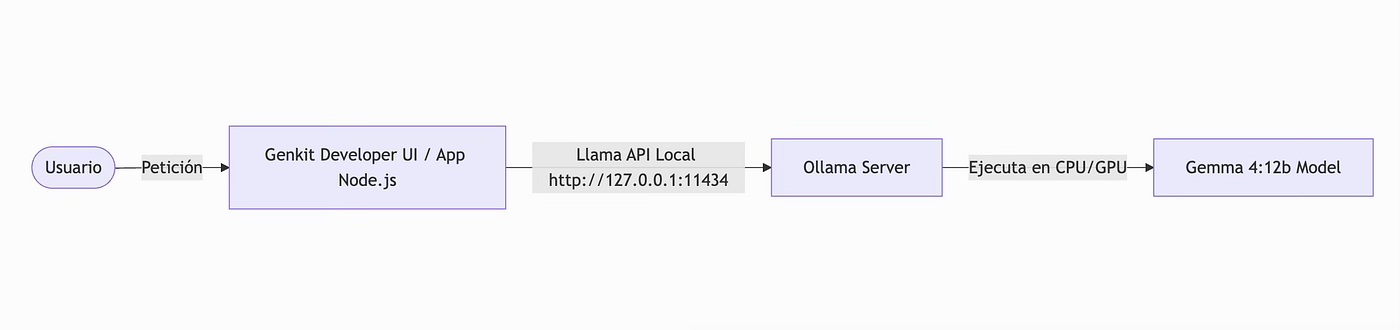
The local Ollama server exposes an endpoint consumed by the official Ollama plugin for Genkit (genkitx-ollama), processing the entire generation flow on your own CPU/GPU.
Steps to Build the Application
To make your life easier and avoid tedious initial setup, I have prepared a ready-to-use boilerplate with TypeScript, Genkit, and Ollama.
Prerequisites
Before getting started, you will need:
- Node.js 20 or higher
- Ollama installed
- npm
- At least 16 GB of RAM recommended to run Gemma 4 (12B)
Step 1: Install and Run Ollama
- Download and install Ollama from its official website: ollama.com.
- Open your terminal and run the following command to download the
gemma4:12bmodel:
ollama pull gemma4:12b
This will download the model locally onto your operating system.
Step 2: Clone and Configure the Project
Clone the boilerplate repository I created and navigate into it:
git clone https://github.com/lperezp/genkit-template.git
cd genkit-template
If you have any questions about the boilerplate, feel free to leave a comment or reach out to me directly on social media.
Install the required dependencies:
npm install
Step 3: The Core (src/index.ts)
In the main file src/index.ts, we initialize Genkit, register the Ollama plugin pointing to the local model, and define a Flow.
In Genkit, a Flow represents a reusable unit of AI logic. It can accept inputs, execute model calls, and return a typed response.
import { genkit, z } from 'genkit';
import { ollama } from 'genkitx-ollama';

// Define the default local Ollama model and server
const OLLAMA_MODEL = 'ollama/gemma4:12b';
const OLLAMA_SERVER = 'http://127.0.0.1:11434';

// Configure Genkit with the Ollama plugin
const ai = genkit({
  plugins: [
    ollama({
      models: [{ name: OLLAMA_MODEL }],
      serverAddress: OLLAMA_SERVER,
    }),
  ],
});

// Example Flow: suggests a dish based on a restaurant theme
export const menuSuggestionFlow = ai.defineFlow(
  {
    name: 'menuSuggestionFlow',
    inputSchema: z.string(), // Accepts a theme (e.g. "Modern Italian")
    outputSchema: z.string(), // Returns a menu suggestion generated by Gemma 4
  },
  async (restaurantTheme) => {
    const { text } = await ai.generate({
      model: OLLAMA_MODEL,
      prompt: `Invent a menu item for a ${restaurantTheme} themed restaurant.`,
    });
    return text;
  }
);
The genkitx-ollama plugin registers a model provider inside Genkit. From that moment on, any Flow can use a model hosted on Ollama in the exact same way it would use Gemini or OpenAI, simply by changing the model identifier.
One of the main advantages of Genkit is how easy it is to switch providers. If you later want to use Gemini, OpenAI, or another compatible provider, you usually only need to update the plugin configuration without touching your Flows' logic.
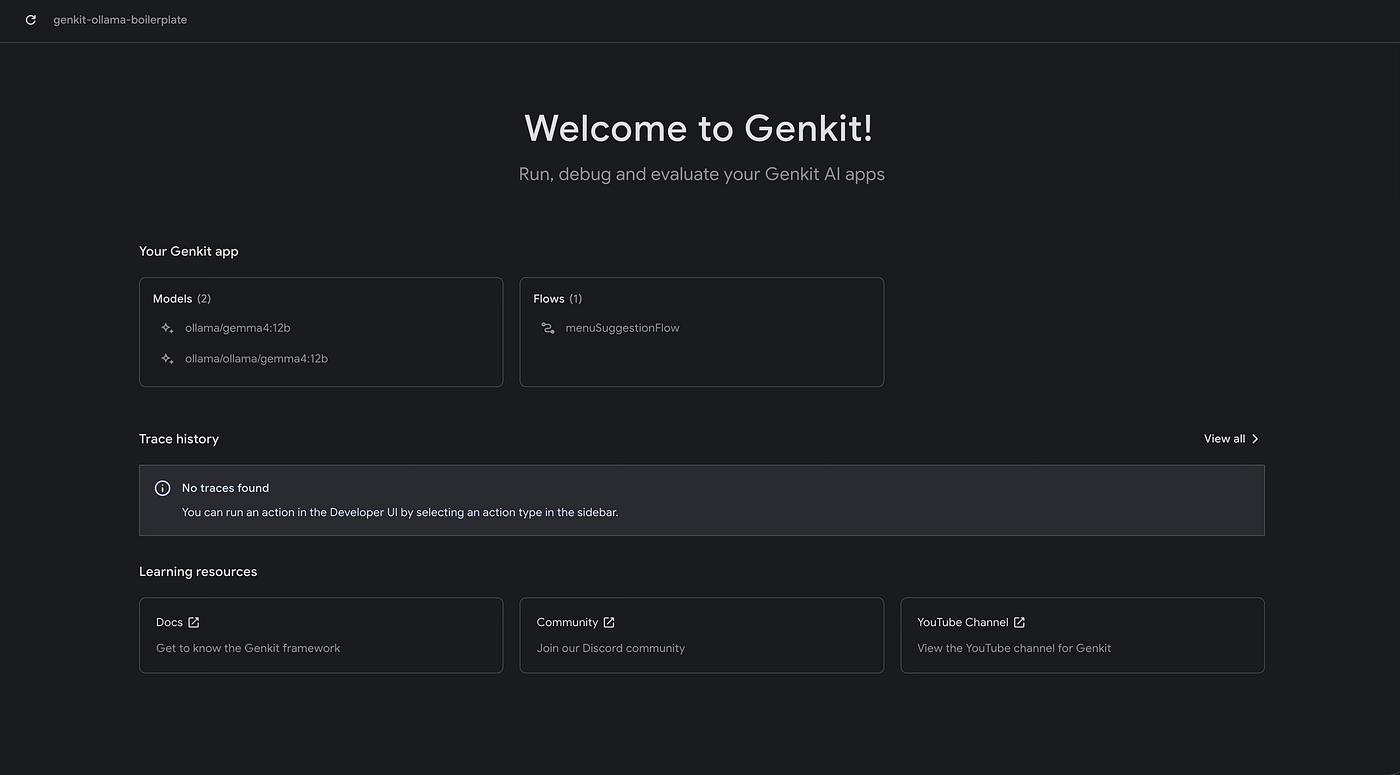
Step 4: Start the Genkit Developer UI
One of Genkit's best features is its graphical Developer UI. Run the following command to start your local server with hot-reload:
npm run genkit:dev
This will open the Genkit UI in your browser (typically at http://localhost:4000), where you can interact with your flows.
Step 5: Testing the Flow Locally
Inside the Genkit UI, go to the menuSuggestionFlow flow, enter a parameter (for example, "space travel"), and press Run.
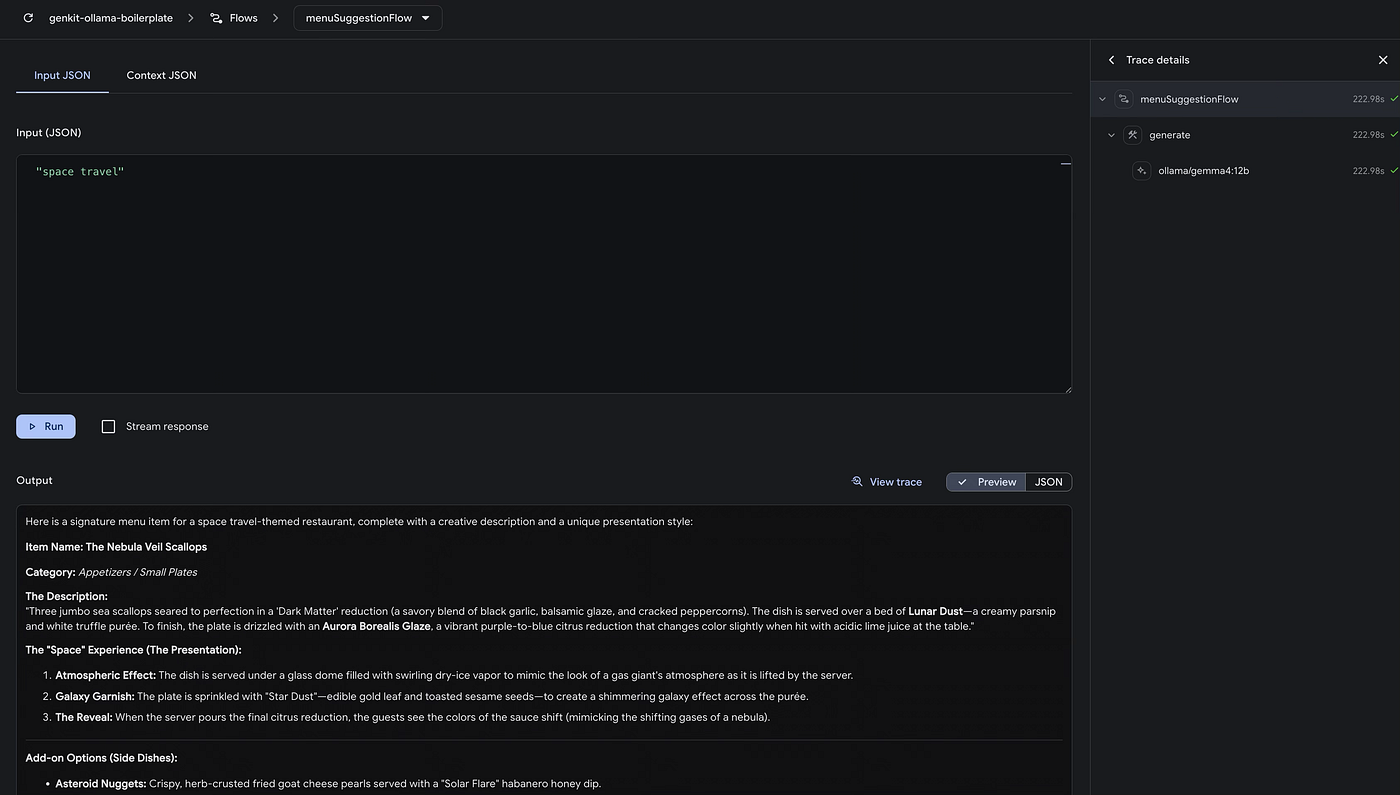
You will see Gemma 4 generate a menu suggestion locally in real time, along with a detailed execution trace and the model's response—all without making a single request outside your machine.
Why Use Genkit Instead of Calling Ollama Directly?
Although Ollama exposes an HTTP API that can be consumed directly, Genkit provides an abstraction layer that simplifies defining Flows, typing inputs and outputs, observability through the Developer UI, and switching providers without modifying your application logic.
Conclusions
Just a few years ago, running a model of this size required specialized infrastructure. Today, installing Ollama and writing a few lines of code is enough to start building completely local applications with Genkit.
This combination makes Genkit and Ollama an excellent alternative for developing, testing agents, and building AI pipelines without relying on external services—both during development and in scenarios where data privacy and control are critical.
Have you already tried Gemma 4 locally? Let me know your thoughts, questions, or anything you'd like to share. 🦙💻
If you want to get started right away, you can clone the ready-to-use boilerplate on GitHub: lperezp/genkit-ollama-boilerplate.
If you find it useful, don't forget to leave a ⭐ on the repository.