A simple CSS class refactoring can break dozens of automated tests. Not because the business flow has changed, but because the scripts depend on fragile selectors. What if, instead of programming each interaction, we could describe the objective and let an agent decide how to achieve it?
With the arrival of cognitive agent-oriented development and the Model Context Protocol (MCP) ecosystem, a disruptive alternative emerges: delegating test execution to an autonomous QA agent.
In this article, we analyze the technical architecture of web-flow-agent, an autonomous testing engine that uses Gemini and the Chrome DevTools MCP server to interpret natural language scenarios, navigate web applications, and generate detailed diagnostics without writing a single line of traditional automation code.
Agent Execution Flow
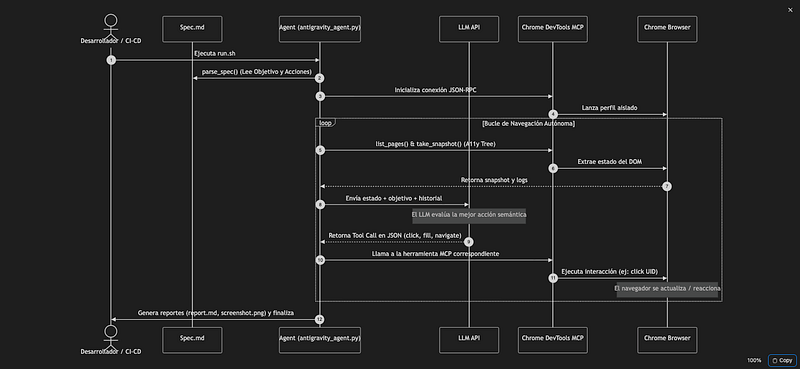
The following sequence diagram illustrates the complete agent execution journey, from reading the specification to the interactive navigation and decision-making cycle:
What Really Makes This Agent "Autonomous"?
A common mistake when talking about AI agents is confusing a sequential script that makes API calls with a real agent. Autonomous doesn't just mean the system can call external tools. An agent is autonomous because it is capable of managing its state, having memory of the objective, re-planning, and deciding when to finish.
The agent operates under a dynamic decision-making loop:
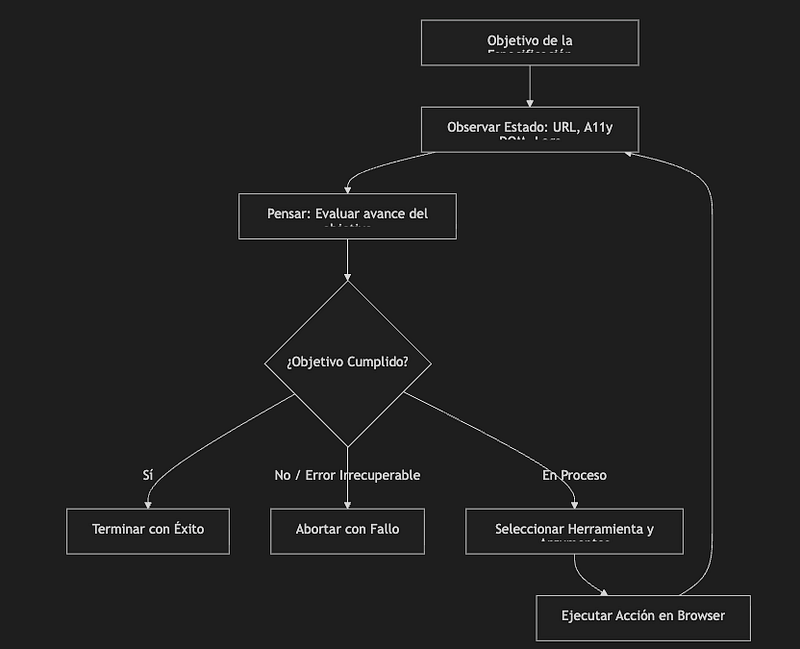
Unlike a script that fails if the button isn't clickable at the exact millisecond, this agent:
- Maintains memory of previous turns (history of steps taken and past thoughts).
- Re-plans its strategy if an action doesn't have the desired effect (for example, if clicking doesn't change the URL, it looks for alternative ways to interact).
- Decides when to abort if it detects severe JavaScript console exceptions or network responses with 500 errors that block the continuity of the business flow.
The Markdown Specification
Many automation frameworks force teams to learn a specific language or write extensive Cucumber files. In this project, the specification is written in standard, clean Markdown:
# Scenario: Validate Complete Purchase Flow
- **Objective:** Visit the home page, select a product from the main showcase to go to its PDP, select size/color options, add it to the cart, proceed to checkout, and complete the shipping and payment details to validate the purchase.
- **Action:** Visit /
- **Action:** Choose the first available product from the main showcase and enter its PDP
- **Action:** Validate that the PDP loads correctly (showing the price and purchase button)
- **Action:** Select a color/size option if required to enable the purchase button
- **Action:** Click the "Agregar al carrito" button
- **Action:** In the confirmation modal, click the "Ir al checkout" button
- **Action:** Validate that the checkout page loads correctly and the product is displayed in the Order Summary
- **Action:** Complete the shipping information: Email "hi@lperezp.dev", Full Name "Luis Eduardo", Shipping Address "Calle Principal 123", City "Lima", Postal Code "15001"
- **Action:** Complete the payment information: Card Number "1111222233334444", Expiration "12/28", CVV "123"
- **Action:** Click the "Pagar" button and wait for the payment to process and the confirmation page to appear
- **Action:** Validate that the payment confirmation page loads successfully
The agent's parse_spec parser uses simple regular expressions to dynamically extract both the objective and actions. This reduces the learning curve: any team member (including Product Managers) can write or modify test flows without needing to know how to code.
The Agent Prompt: The Cognitive Engine
The core of the agent lies in its system instructions (System Prompt). Through them, we define its role as a technical auditor and the strict JSON format it must use to interact. Here's a simplified version of the main guidelines provided to the model:
You are an Autonomous QA Agent. Your mission is to validate a test flow on a web application by interpreting a Markdown specification file.
You interact with the page by calling tools from the Chrome DevTools MCP server.
At each turn, you will receive:
- The Objective of the test flow.
- The Steps/Actions to validate.
- The current URL and accessibility snapshot of the DOM.
- Recent JS console logs and network requests.
- The history of actions you have already performed.
Your response MUST be a valid JSON object complying with this structure:
{
 "thought": "Detailed explanation of what you observe on the page and what you decide to do next.",
 "action": "call_tool" | "success" | "fail",
 "tool_name": "navigate_page" | "click" | "fill" | "wait_for" | "evaluate_script",
 "tool_arguments": { … },
 "message": "Reason for success or failure (only if action is 'success' or 'fail')."
Critical Rules:
1. Only use elements and UIDs that exist in the most recent snapshot provided.
2. If you see a severe console error or a network request with status >= 400/500 that prevents completing the flow, select "action": "fail".
3. Once all actions in the spec are verified, select "action": "success".
The Execution Loop
To understand how decision-making works and how it interacts with the MCP protocol, let's look at the main execution loop of antigravity_agent.py:
   # Get page state
            pages_text = client.call_tool_text("list_pages", {})
            pages = parse_pages(pages_text)
            current_url = "unknown"
            for p in pages:
                if p["selected"]:
                    current_url = p["url"]
                    break

            # Take DOM snapshot
            dom_snapshot = client.call_tool_text("take_snapshot", {})

            # Get diagnostics (console and network)
            try:
                console_logs = client.call_tool_text("list_console_messages", {"pageSize": 20})
            except Exception:
                console_logs = "Not available"

            try:
                network_requests = client.call_tool_text("list_network_requests", {"pageSize": 20})
            except Exception:
                network_requests = "Not available"

            # Compile content prompt
            user_content = {
                "objective": objective,
                "actions": actions,
                "current_url": current_url,
                "dom_snapshot": dom_snapshot,
                "console_logs": console_logs,
                "network_requests": network_requests,
                "history": history
            }

            contents = [
                {"role": "user", "parts": [{"text": json.dumps(user_content, indent=2)}]}
            ]

            print("Querying Gemini...", flush=True)
            response = call_gemini(api_key, system_instruction, contents)

            thought = response.get("thought", "")
            action = response.get("action", "")

            print(f"Agent Thought: {thought}", flush=True)
The Chrome DevTools MCP Ecosystem
Feeding an LLM with raw HTML code is usually inefficient due to high token consumption and visual noise. Through MCP integration, the agent consumes the accessibility tree (A11y tree) via the take_snapshot tool.
This provides the agent with a simplified, logical list of semantic and interactive elements on screen:
[2_9] link "Acme Cap"
[3_7] button "Black"
[3_11] button "Agregar al carrito"
[7_4] textbox "Email"
The model directly associates the accessibility UID with its logical intention, allowing clicks (click with uid) or field fills (fill with uid and value) without requiring complex XPath searches or fragile CSS selectors.
A Test Case in Action
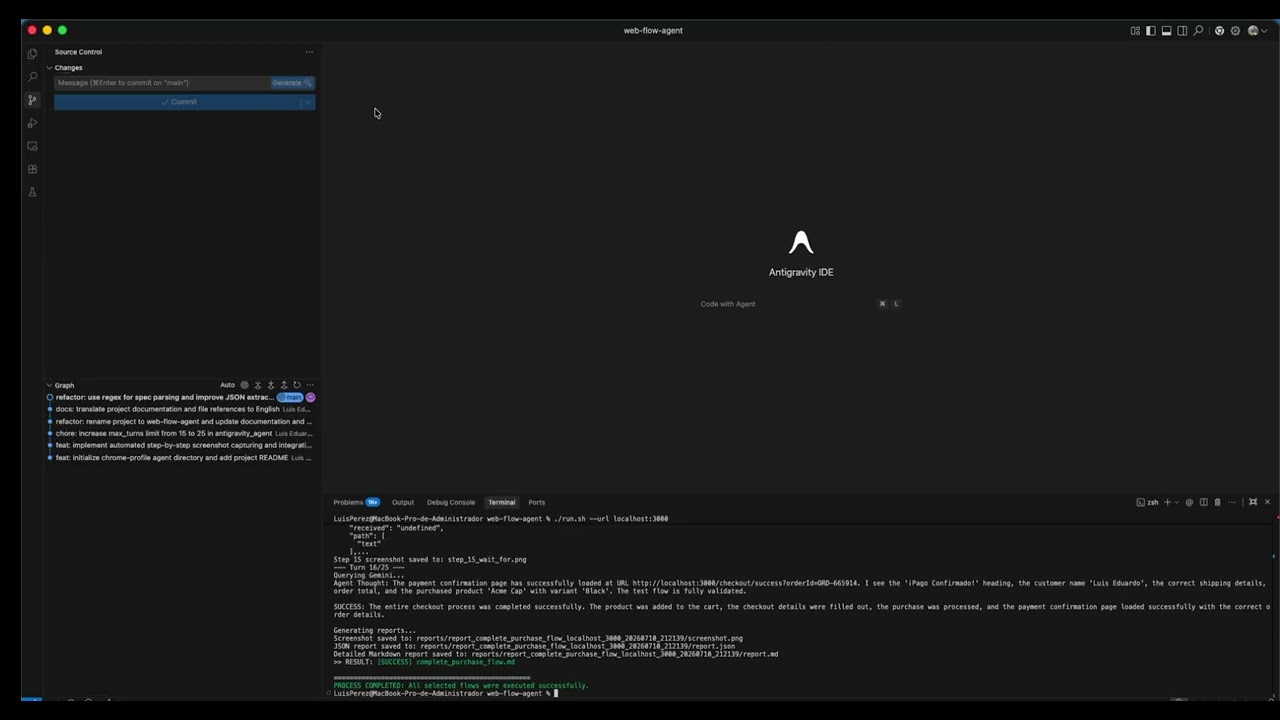
To illustrate the agent interacting in real time, let's look at its behavior on a purchase validation flow at localhost:3000:
Autonomous Execution History
The agent follows flows similar to those of a real user, but with simultaneous access to technical browser information:
- Initial Navigation: The agent navigates to
localhost:3000. - Product Selection: Gemini semantically identifies the "Acme Cap" product link based on the A11y tree and performs a
clickaction on its UID. - Size/Color Variation: Clicks the "Black" color button to enable checkout.
- Checkout: Adds the item to the cart, opens the side panel, and proceeds to checkout.
- Shipping Form: Fills in fields like email, full name, and address through sequential
fillcalls. - Payment: Enters the test card information and successfully confirms the transaction, visually validating that the success message appears.
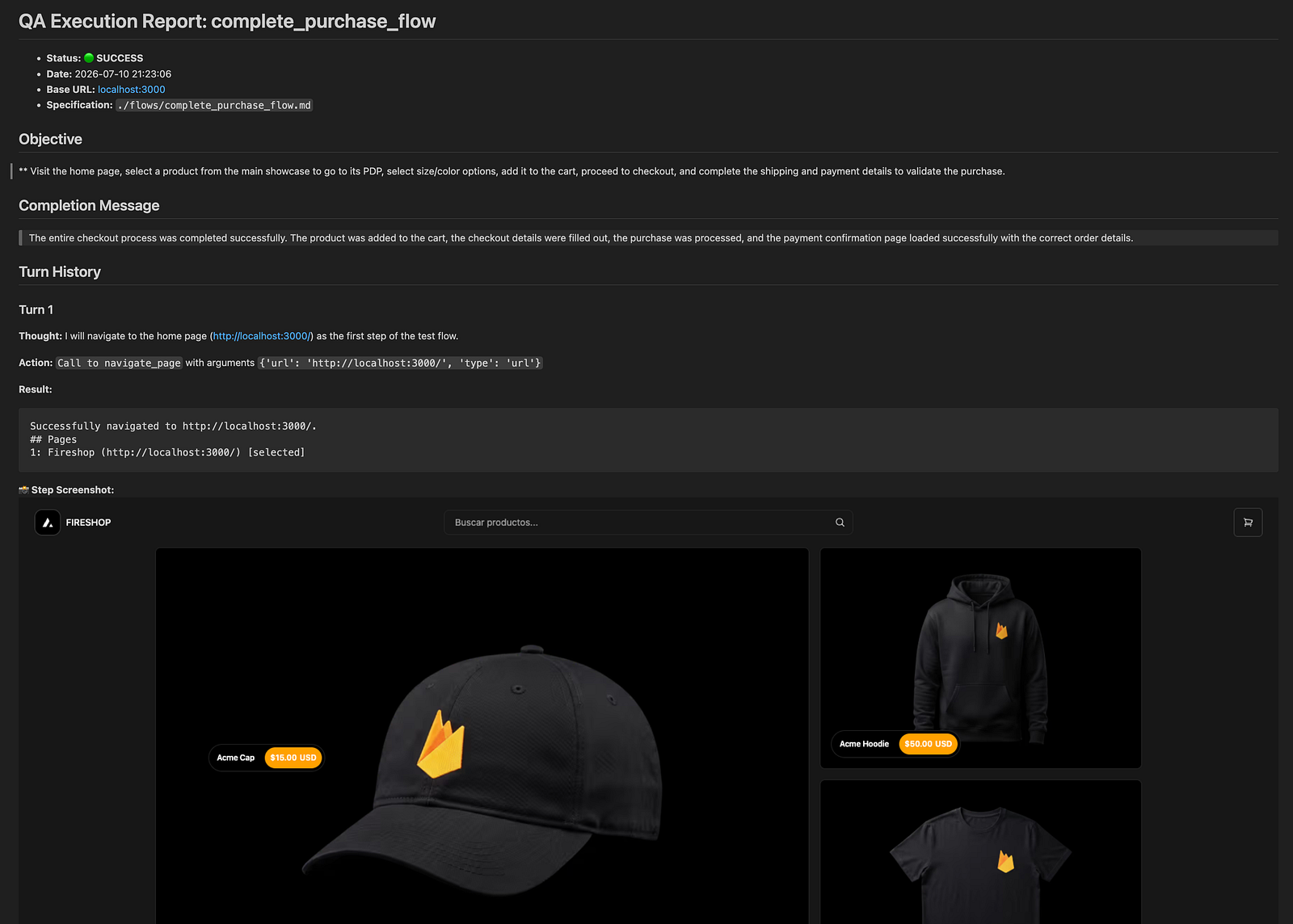
Upon completion, the agent evaluates the visual and technical response and auto-detects the flow's success, closing with an exit code and exporting all documentation to the reports folder.
Current Limitations
As with any cutting-edge approach, this agent architecture has certain limitations that are important to consider to maintain a realistic balance:
- Token Consumption: In extremely long test flows, accumulating historical accessibility snapshots, network logs, and console messages in the context can significantly increase token consumption.
- Complex Authentication and CAPTCHAs: Applications requiring third-party Single Sign-On (SSO), multi-factor authentication (MFA), or CAPTCHA resolution represent barriers that the agent cannot resolve autonomously without prior intervention.
- Low-Level Testing: The use of cognitive agents does not replace unit or low-level integration tests.
Source code
The full source code is available on GitHub: web-flow-agent
To start the agent locally against your development environment, you just need to export your API Key and run the orchestrator:
./run.sh - url [url]
Conclusion
The combined use of Chrome DevTools MCP and LLM-based agents changes the rules of the game in software testing. It doesn't mean that test suites have zero maintenance cost (there will always be maintenance when the product or business flows change), but it drastically reduces the maintenance associated with selectors and imperative scripts.